---
title: "Self-host OpenHands"
description: "Self-host OpenHands Agent Canvas on an exe.dev VM: the web UI behind exe.dev login, each conversation in its own Docker sandbox, and models with no API keys."
url: https://exe-staging.dev/deploy/openhands
category: "AI agents"
updated: 2026-11-13
---
# Self-host OpenHands
The OpenHands web UI and its Docker sandboxes on one VM. No API keys to paste.
- **Software:** OpenHands (https://openhands.dev/)
- **Source:** https://github.com/OpenHands/OpenHands
- **License:** MIT
- **Time:** 15 minutes
- **Example VM name:** `my-openhands` (yours will differ; on the VM, `hostname` prints it)
- **Machine-readable:** https://exe-staging.dev/deploy/openhands/manifest.json
## What you get
- Agent Canvas 1.40.0 running as a service on port 8000, back after a reboot
- Conversations in Docker sandboxes by default, one container per conversation, with only its project folder mounted
- The OpenHands agent on Claude Sonnet 5.5 through exe.dev's LLM integration, with no API key to paste
- A random backend API key in `~/.config/agent-canvas/env`, readable only by you
- A project at `~/projects/hello` and a setup-check conversation that ran in a container and answered `42`
Running on the VM:
- **Agent Canvas 1.40**: @openhands/agent-canvas from npm on Node.js 24, as a systemd service, port 8000, data in `~/.config/agent-canvas (API key)`
- **Agent Server 1.62**: started by Agent Canvas; runs conversations, settings, secrets and automations, data in `~/.openhands`
- **Docker sandboxes**: one ghcr.io/openhands/agent-server container per conversation, with only its project folder mounted, data in `~/projects`
How it is reached:
- https://my-openhands.exe.xyz/ (private): Agent Canvas in your browser, behind exe.dev login and OpenHands' API key
- ssh my-openhands.exe.xyz (private): your terminal, for the API key and upkeep
## Deploy with Shelley
Open https://exe-staging.dev/new?prompt=Set%20up%20OpenHands%20on%20this%20VM%20by%20following%20the%20exe.dev%20recipe%20at%20https%3A%2F%2Fexe-staging.dev%2Fdeploy%2Fopenhands.md%20from%20top%20to%20bottom.%0A%0AThe%20recipe%27s%20example%20VM%20name%20is%20my-openhands.%20This%20VM%27s%20name%20is%20the%20output%20of%20%60hostname%60%3A%20use%20it%20wherever%20the%20recipe%20writes%20my-openhands.%20Skip%20the%20step%20that%20creates%20the%20VM%3B%20you%20are%20on%20it.%0A%0AYou%20are%20done%20when%20all%20of%20these%20are%20true.%20Check%20each%20one%20yourself%3A%0A-%20Agent%20Canvas%201.40.0%20running%20as%20a%20service%20on%20port%208000%2C%20back%20after%20a%20reboot%0A-%20Conversations%20in%20Docker%20sandboxes%20by%20default%2C%20one%20container%20per%20conversation%2C%20with%20only%20its%20project%20folder%20mounted%0A-%20The%20OpenHands%20agent%20on%20Claude%20Sonnet%205.5%20through%20exe.dev%27s%20LLM%20integration%2C%20with%20no%20API%20key%20to%20paste%0A-%20A%20random%20backend%20API%20key%20in%20%60~%2F.config%2Fagent-canvas%2Fenv%60%2C%20readable%20only%20by%20you%0A-%20A%20project%20at%20%60~%2Fprojects%2Fhello%60%20and%20a%20setup-check%20conversation%20that%20ran%20in%20a%20container%20and%20answered%20%6042%60%0A%0ARun%20the%20VM-side%20commands%20in%20%22Install%20by%20hand%22%20only%2C%20from%20%22Install%20Agent%0ACanvas%22%20on.%20Verify%20that%20%60systemctl%20is-active%20agent-canvas%60%20says%20active%2C%0Athat%20%60curl%20-s%20-o%20%2Fdev%2Fnull%20-w%20%27%25%7Bhttp_code%7D%27%20localhost%3A8000%2Fapi%2Fsettings%60%0Aprints%20%60401%60%20%28the%20API%20key%20is%20on%29%2C%20and%20that%20the%20setup%20check%20prints%0A%60%7B%22response%22%3A%2242%22%7D%60.%20Never%20print%20the%20API%20key%20in%20your%20messages.%20Skip%20the%0Abackup%2C%20update%20and%20troubleshooting%20sections%20and%20the%20FAQ.%20Finish%20by%0Agiving%20the%20owner%20the%20browser%20URL%20and%20the%20command%20from%20%22Open%20OpenHands%22%0Athat%20prints%20the%20API%20key%2C%20with%20this%20VM%27s%20name%2C%20and%20tell%20them%20to%20follow%0A%22Open%20OpenHands%22%2C%20unticking%20the%20usage-data%20box%20if%20they%20prefer.%0A%0AFinish%20with%20the%20URLs%20I%20should%20open.%0A to create a VM whose agent, Shelley, follows this recipe. From a terminal:
```sh
curl -fsSL https://exe-staging.dev/deploy/openhands/prompt.txt | ssh exe.dev new --prompt=/dev/stdin
```
Or follow the steps below by hand.
[OpenHands](https://openhands.dev/) (once OpenDevin) is an open-source
coding agent that writes code, runs commands and commits its work.
Its self-hosted app, Agent Canvas, is a web UI for conversations, files,
terminals and scheduled automations, backed by an Agent Server that runs
the agent. OpenHands' own docs call a server in the cloud the most powerful
way to run it. On an exe.dev VM the agents keep working when your laptop
sleeps, the UI is reachable over HTTPS behind exe.dev's login, and each
conversation gets its own Docker sandbox on the same VM.
Models come from exe.dev's [LLM integration](/docs/integrations-llm):
Claude, GPT and open-weight models with no API key to paste, and usage
billed to your exe.dev account.
## Install
Deploy installs Agent Canvas, runs it as a service with Docker sandboxes
and an API key, connects a model, and checks that a sandboxed conversation
answers. To do it yourself:
Install by hand
On your computer, create a VM and connect. Pick any free name; if you
already have a VM, skip the first command and use its name:
```bash
ssh exe.dev new --name=my-openhands
ssh my-openhands.exe.xyz
```
### Install Agent Canvas
On the VM, install Node.js 24 from NodeSource (Agent Canvas needs it; the
VM's own is older), then Agent Canvas from npm, with the version pinned.
Global npm packages go in `~/.local`, so updates need no sudo:
```bash
curl -fsSL https://deb.nodesource.com/setup_24.x | sudo -E bash -
sudo apt-get install -y nodejs
npm config set prefix ~/.local
npm install -g @openhands/agent-canvas@1.40.0
export PATH="$HOME/.local/bin:$PATH"
agent-canvas --version
```
It prints `1.40.0`. npm warns that a few packages have install scripts it
didn't run; that's fine. Agent Canvas fetches its Python services with
`uv`, which the VM already has.
### Turn on Docker sandboxes
Start Docker, and pull the sandbox image that matches this Agent Canvas
release. It's 5.5 GB, so pulling it now spares your first conversation the
wait:
```bash
sudo systemctl enable --now docker.service
docker pull ghcr.io/openhands/agent-server:1.62.0-python
```
### Run it as a service
Give Agent Canvas a random API key and turn on Docker sandboxes, in a file
only you can read:
```bash
mkdir -p ~/.config/agent-canvas
install -m 600 /dev/null ~/.config/agent-canvas/env
cat > ~/.config/agent-canvas/env </dev/null </dev/null
```
The first line prints `{"valid":true,"error":null}`. Then make a project
and run a one-line conversation in it:
```bash
mkdir -p ~/projects/hello && git -C ~/projects/hello init -q
agent=$(oh agent-profiles | jq -r .active_agent_profile_id)
id=$(oh conversations -d '{"agent_profile_id":"'"$agent"'",
"workspace":{"working_dir":"'"$HOME"'/projects/hello"},
"initial_message":{"role":"user","content":[{"type":"text",
"text":"Create hello.py that prints 6*7 and run it. Reply with its output only."}]}}' | jq -r .id)
until oh conversations/$id | jq -e '.execution_status == "finished"' >/dev/null; do sleep 5; done
oh conversations/$id/agent_final_response
docker ps --format '{{.Names}} {{.Status}}'
```
It prints `{"response":"42"}`, and `docker ps` lists an
`agent-server-conversation-…` container: the agent worked in a sandbox,
and `~/projects/hello/hello.py` is on the VM.
## Open OpenHands
Port 8000 is private: only people with access to the VM get past exe.dev's
login, and Agent Canvas asks for its API key on top. On your computer,
print the key:
```bash
ssh my-openhands.exe.xyz "sed -n 's/^LOCAL_BACKEND_API_KEY=//p' .config/agent-canvas/env"
```
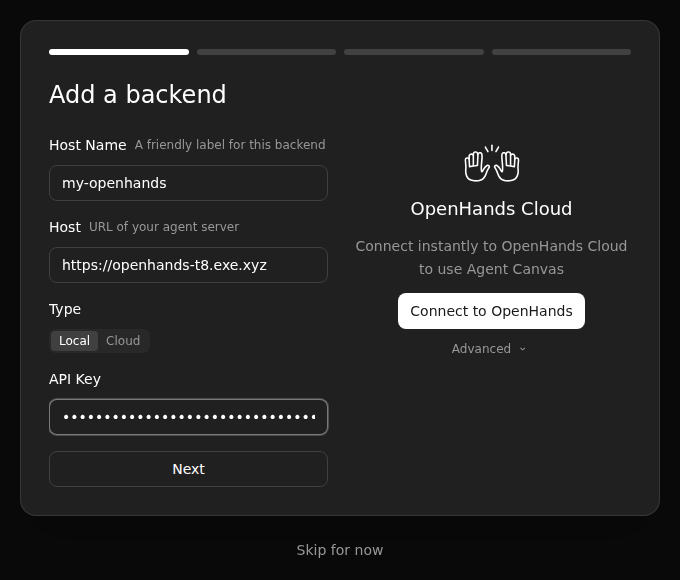
Open `https://my-openhands.exe.xyz/` and log in to exe.dev. The page stays
blank for a few seconds the first time, then Agent Canvas asks you to
**Add a backend**. The host is already filled in. Give it a name, keep
**Local** (it means a backend you run, not OpenHands Cloud), paste the key,
and choose **Next**.
The browser remembers the backend, so you do this once per browser.
OpenHands then asks to **Help improve OpenHands** with **Send anonymous
usage data** ticked; untick it if you'd rather not, and confirm. Keep
**OpenHands** as the agent. **Set up your LLM** already shows the exe.dev
profile from the install, so choose **Next**, then **Close**.
On the home screen, the chip under the message box says **Docker**. Choose
**Open Workspace**, then **+ Add Workspace**, pick `projects` under
**Favorites**, and **Add all subdirectories**. Select `hello`, confirm, and
give it a task:
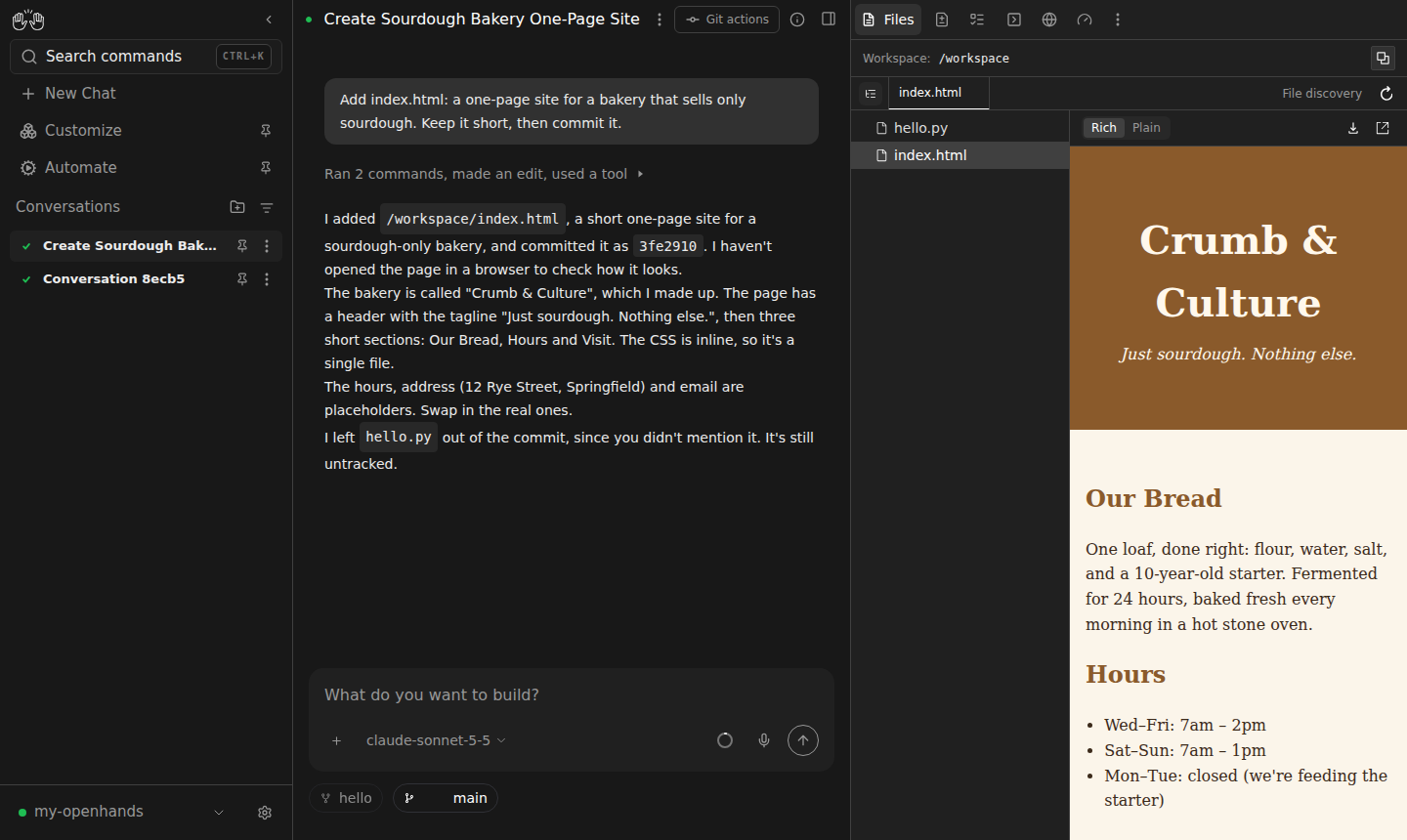
> Add index.html: a one-page site for a bakery that sells only sourdough. Keep it short, then commit it.
The agent worked in a Docker sandbox; the file and the commit are in ~/projects/hello on the VM.
The agent sees the folder as `/workspace`, inside its own container. The
panel on the right shows its files, changes, terminal and browser. Close
the tab and come back later: the conversation keeps going on the VM. On a
phone, open the same address, log in to exe.dev and add the backend the
same way.
A few things worth knowing:
- **Pick a model** from the menu under the message box, or add one under
**Settings → LLM**, **Advanced** tab. For exe.dev's gateway, use
`anthropic/claude-opus-5-5` with base URL `https://llm.int.exe.xyz`,
`openai/gpt-5.5` with `https://llm.int.exe.xyz/v1`, or
`fireworks_ai/accounts/fireworks/models/glm-5p3` with
`https://llm.int.exe.xyz/fireworks/inference/v1`, and any text as the API
key.
- **Switch runtimes** with the **Docker** chip, per conversation, or set
the default under **Settings → Runtime**, which also sets the sandbox's
memory and CPU limits. **Worktree** runs on the VM in a fresh Git
worktree.
- **Preview what it builds** from a **Local** conversation: ask the agent
to serve the app on `0.0.0.0:3000`, then open
`https://my-openhands.exe.xyz:3000/`. It's private until you
[share it](/docs/sharing). A Docker sandbox's ports stay inside its
container.
- **Set the commit author** per project, since sandboxes start without your
Git identity: `git -C ~/projects/hello config user.name "Your Name"` and
`user.email` on the VM. The repository's own config is inside the
mounted folder, so every runtime uses it.
> [!WARNING]
> Anyone with the API key who gets past exe.dev's login can run any
> command on the VM: the Local runtime is the VM. Keep the VM private, and
> only share it with people you'd give your SSH key to.
## Sandboxes and the Docker socket
Agent Canvas runs as you, and you are in the `docker` group, so the Agent
Server can start containers. Membership in that group is as good as root on
the VM. The sandboxes don't get the socket: each one mounts only its
project folder, its conversation's state and a small home directory, runs
as your user ID with no capabilities, and can't gain privileges. Don't add
`/var/run/docker.sock` to a sandbox, and don't run Agent Canvas itself in a
container with the socket mounted: either hands the agent the whole VM.
The sandbox limits what the agent can touch on disk, not what it can
reach: containers share the VM's network, so they can reach exe.dev's LLM
gateway and every [integration](/docs/integrations) attached to the VM.
That's what lets a sandboxed agent push through a GitHub integration, and
it's why each integration should cover only the repositories you want
agents to have.
## Bring your repositories
There are two ways to give OpenHands GitHub, and they suit different jobs.
**exe.dev's GitHub integration**, for cloning, committing, pushing and the
`gh` CLI. No GitHub token sits on the VM: exe.dev adds the credentials as
requests leave it. [Connect your GitHub account](/docs/integrations-github),
then on your computer add a repository to the VM:
```bash
ssh exe.dev integrations add github --name your-repo --repository you/your-repo --attach vm:my-openhands
```
On the VM, clone it into `~/projects` and add it as a workspace:
```bash
git clone https://github.int.exe.xyz/you/your-repo.git ~/projects/your-repo
```
The remote points at the integration, so the agent's pushes go through it,
from a sandbox too. For `gh`, tell the agent to set
`GH_HOST=github.int.exe.xyz`. Add `--readonly` to the integration for an
agent that reads but never pushes, and `--act-as-user` to have pushes show
as you instead of the exe.dev bot.
**A GitHub token**, for OpenHands' own GitHub features: the **GitHub code
review** and **GitHub issue to PR** automations and the GitHub MCP server
call GitHub's API with a token they read from **Settings → Secrets**. Make
a fine-grained token for only the repositories they need, with an expiry,
and save it there as the automation's setup asks. The trade-off: secrets
are exported into every conversation's environment, so any agent run can
read the token, and it's stored on the VM, encrypted with a key that sits
next to it in `~/.openhands`. Use the integration for everyday Git work,
and a token only for the automations that need one.
## Drive it from scripts
The Agent Server behind Agent Canvas has a REST API, described at
`/openapi.json`. On the VM, with the `oh` helper from
[Connect a model and check](#connect-a-model-and-check), start a
conversation, wait for it, and read its answer as in the setup check. To
ask from your computer instead, run the same commands over
`ssh my-openhands.exe.xyz`; port 8000 is behind exe.dev's login, so
scripts elsewhere can't reach it.
For work on a schedule, **Automate** in the sidebar runs a prompt or a
script on a cron schedule, on the VM, with the same model and sandboxes.
## Back up and restore
Commit and push your code; that's the copy that matters most. For a copy
of the whole VM, run this on your computer (choose a free backup name):
```bash
ssh exe.dev cp my-openhands my-openhands-backup
```
To keep OpenHands' settings and conversations on their own, archive them on
the VM. The archive holds the API key and the key that decrypts saved
secrets, so keep it private:
```bash
mkdir -p ~/backups
sudo systemctl stop agent-canvas
tar -C ~ -czf ~/backups/openhands-$(date +%F).tar.gz .openhands .config/agent-canvas projects
chmod 600 ~/backups/openhands-*.tar.gz
sudo systemctl start agent-canvas
```
Conversations started without a workspace keep their files in
`~/workspace`; add it to the `tar` command if you have it. To restore, on a
VM installed as above, replace `2026-11-13` with the archive's date:
```bash
sudo systemctl stop agent-canvas
rm -rf ~/.openhands
tar -C ~ -xzf ~/backups/openhands-2026-11-13.tar.gz
sudo systemctl start agent-canvas
```
Your conversations are listed again, and browsers that know the old API
key keep working.
## Update
On the VM, update Agent Canvas, then point the sandboxes at the Agent
Server image it now expects:
```bash
npm install -g @openhands/agent-canvas@latest
v=$(agent-canvas --info | awk '$1 == "agent-server:" {print $2; exit}')
docker pull ghcr.io/openhands/agent-server:$v-python
sed -i "s|^OH_CONVERSATION_IMAGE=.*|OH_CONVERSATION_IMAGE=ghcr.io/openhands/agent-server:$v-python|" ~/.config/agent-canvas/env
sudo systemctl restart agent-canvas
```
Restarting interrupts running conversations, so pick a quiet moment.
OpenHands releases every few days; read the
[release notes](https://github.com/OpenHands/OpenHands/releases) first.
Each old sandbox image takes 5.5 GB: list them with `docker image ls` and
remove the ones you're done with with `docker image rm`.
## Troubleshooting
- **The page stays blank.** Give it ten seconds the first time. If it
still doesn't load, on the VM run `systemctl status agent-canvas` and
`journalctl -u agent-canvas -n 80 --no-pager`; `ss -ltn | grep 8000`
should show `0.0.0.0:8000`.
- **Adding the backend fails.** The key is wrong or has a stray space:
print it again with the command from "Open OpenHands". The host must be
`https://my-openhands.exe.xyz`, with no port.
- **"Creating conversation…" never ends.** The sandbox image is missing or
still downloading: `docker image ls` should list the tag in
`~/.config/agent-canvas/env`. `docker ps -a` and
`docker logs ` show a sandbox that started and stopped.
- **A model fails.** Run the `validate` call from
[Connect a model and check](#connect-a-model-and-check) with that model's
name and base URL; its error says what's wrong.
- **The disk fills up.** `docker system df` shows what Docker holds. Remove
old sandbox images, or grow the disk with
`ssh exe.dev resize my-openhands --disk=50GB` on your computer, then
`sudo resize2fs $(findmnt -no SOURCE /)` on the VM.
- **Sandboxes are slow or get killed.** Each may use 4 GB and 2 CPUs. Lower
the limits under **Settings → Runtime**, or resize the VM.
- **`agent-canvas: command not found`.** Open a new shell, or use
`~/.local/bin/agent-canvas`.
For everything else, see OpenHands'
[Docker runtime guide](https://docs.openhands.dev/openhands/usage/agent-canvas/backend-setup/docker-execution.md)
and [VM guide](https://docs.openhands.dev/openhands/usage/agent-canvas/backend-setup/vm.md).
## Frequently asked questions
### Why does OpenHands want an API key when exe.dev already asks me to log in?
They guard different things. exe.dev's login decides who reaches the VM's web port: you, and anyone you [share the VM](/docs/sharing) with. The API key decides who gets the Agent Server, which can run commands, read secrets and start containers. OpenHands' own [VM guide](https://docs.openhands.dev/openhands/usage/agent-canvas/backend-setup/vm.md) asks for both a strong key and access control in front of it. Keep the VM private, and the browser remembers the key after the first visit.
### Docker or Local runtime?
Docker, unless the agent needs the whole VM. A Docker conversation runs in its own container as your user, with every Linux capability dropped, 4 GB and 2 CPUs at most, and only its project folder mounted. A Local conversation runs as you on the VM itself, with sudo, Docker and every port: pick it for work like serving a dev server you open at `https://my-openhands.exe.xyz:3000/`. Either way the agent has the VM's network, including exe.dev's LLM gateway and any [integration](/docs/integrations) you attach.
### Can I use Claude Code, Codex or OpenCode instead of the OpenHands agent?
Agent Canvas can drive them as [ACP agents](https://docs.openhands.dev/openhands/usage/agent-canvas/acp-agents.md): pick one under **Choose your agent**, or later in **Customize**. exe.dev VMs come with Claude Code, Codex and OpenCode installed, and each can use exe.dev's LLM gateway on its own; see [Claude Code](/deploy/claude-code) and [OpenCode](/deploy/opencode). We tested the OpenHands agent, not the ACP ones.
### What about the OpenHands CLI or the old docker run command?
This page installs Agent Canvas, which is what the OpenHands repository ships today, with Docker sandboxes per conversation. The terminal CLI (`openhands` on PyPI) is a separate project whose last release was in May 2026; we didn't test it. To script OpenHands on this VM, use the Agent Server's API, as in [Drive it from scripts](#drive-it-from-scripts).
### How big a VM does it need?
A new VM (2 vCPUs, 8 GB, 25 GB of disk) ran this page. The sandbox image takes 5.5 GB of disk and each running sandbox may use up to 4 GB of memory, so for several conversations at once, give the VM more with `ssh exe.dev resize my-openhands --cpu=4 --memory=16GB`. VMs share your plan's capacity; see [Personal plan](/docs/billing/personal).
### How much does it cost?
OpenHands is free and MIT-licensed. You pay for the VM as part of your exe.dev plan, and model usage through the [LLM integration](/docs/integrations-llm) is billed to your exe.dev account. exe.dev keeps a [list of models and prices](/llm-gateway-models).
### Something's not working. Where do I look?
On the VM, `systemctl status agent-canvas` says whether it's running, `journalctl -u agent-canvas -n 80 --no-pager` shows why it stopped, and `docker ps` lists the sandboxes. [Troubleshooting](#troubleshooting) covers the usual problems.
## Related
- [Run OpenChamber on a remote server](https://exe-staging.dev/deploy/openchamber.md): The OpenCode workbench on an always-on VM, open from any browser or phone.
- [Run OpenCode on a remote server](https://exe-staging.dev/deploy/opencode.md): Every model, one VM, and an agent that works while your laptop sleeps.
- [Run Claude Code on a remote server](https://exe-staging.dev/deploy/claude-code.md): A computer for Claude. A breather for your laptop.
- [Run NVIDIA OpenShell on a remote VM](https://exe-staging.dev/deploy/openshell.md): Agents in OpenShell sandboxes, inside a VM of their own. No API keys on it.
- [Run T3 Code on a remote server](https://exe-staging.dev/deploy/t3code.md): Your coding agents on an always-on VM, steered from your phone.
- [Host OpenClaw](https://exe-staging.dev/deploy/openclaw.md): An AI sidekick with its own computer. Your laptop can take a nap.